Unlocking Growth With Generative AI Business Applications
Feeling the drag of slow content creation, bogged-down customer support, or innovation that's stuck in neutral? It's a common story. But what was once a concept for the future is now a practical tool for getting ahead today. We're talking about generative AI, and it’s helping businesses create entirely new, original content—from text and images to functioning code—using the data they already have.
The New Engine For Business Growth

Generative AI has officially moved from the lab to the mainstream, touching nearly every industry you can think of. This isn't just another trend; it's a fundamental change in how companies work, innovate, and stay competitive. Think of it less as a complex piece of tech and more as a practical solution that businesses of any size can put to work for real growth.
The idea behind it is simple but incredibly powerful: instead of just analyzing data, generative AI creates something new from it. This single capability opens the door to a huge range of generative AI business applications that once felt like science fiction. It can be your on-demand creative team, a tireless assistant for your developers, or a sharp customer service agent that never sleeps.
From Hype To Widespread Use
The move to bring this technology into daily operations is picking up serious speed. A 2024 McKinsey report found that 72% of organizations were already using generative AI in at least one part of their business. That’s a huge leap from just 56% in 2021, which shows just how fast companies are seeing its value. For more numbers, check out this deep dive into generative AI statistics.
This quick adoption is happening because the technology solves real, everyday business problems:
- Content at Scale: Imagine generating thousands of unique product descriptions, social media updates, or personalized marketing emails automatically.
- A Major Efficiency Boost: It can automate the grunt work of creating reports, summaries, and internal memos, freeing up your team's time for what matters.
- Faster Innovation: You can develop prototypes, generate software code, and brainstorm new product concepts in a fraction of the time.
Generative AI isn't about replacing human creativity—it's about amplifying it. It takes on the repetitive, time-draining tasks, so your team can focus on the strategic thinking and high-impact work that actually moves the needle.
This guide is designed to give you a clear map for moving past the buzz and getting tangible results. By understanding where the real opportunities are, you can pinpoint exactly where this technology fits into your own operations. You can read more about the generative AI revolution and its top opportunities in our other article.
Understanding Core Generative AI Capabilities
To really get what generative AI can do for a business, you have to look past the hype and focus on its core functions. It's not one single piece of magic technology; think of it more like a toolkit filled with distinct, powerful tools. Each one is built to solve a fundamental business need, whether that's creating marketing materials or untangling complex operational knots.
At its core, generative AI learns from massive amounts of data to spot patterns. It then uses that knowledge to create something completely new. This is a huge leap from older AI, which could only really analyze or categorize existing information. If you're looking for a solid foundation on the underlying principles, our guide on machine learning for beginners is a great place to start.
Content Generation
This is the capability everyone knows about. Imagine an on-demand creative team that can churn out high-quality text, images, and audio in seconds. This function gives businesses the power to scale their content creation efforts in ways that were previously unimaginable.
Instead of a marketing team spending days agonizing over a single blog post, generative AI can spit out multiple drafts from a simple prompt. It can also write thousands of personalized emails for a campaign, making each one feel unique to the recipient. To see how this works under the hood, exploring how AI models like ChatGPT summarize documents offers a fantastic look into text generation.
Code Generation
For your development teams, this is like having a tireless junior programmer on call 24/7. It significantly speeds up software development by writing code snippets, translating code between different programming languages, and even helping to find and fix bugs.
What does this mean in practice? Your developers can build and test new ideas and prototypes faster than ever. It also brings a bit of coding power to everyone else, allowing employees with minimal technical skills to generate simple scripts using plain English.
Data Synthesis and Augmentation
Sometimes, you just don't have enough data—especially when it comes to training other AI models. Data synthesis is the answer. It lets you create new, realistic data points that look and act just like your original dataset, but are completely synthetic and anonymous.
This is a game-changer for industries like finance and healthcare, where real data is often scarce and packed with privacy restrictions. Synthetic data can be used to stress-test systems, train fraud detection models, or simulate market behavior without ever touching sensitive customer information.
Conversational AI
This is the engine powering the next wave of chatbots and virtual assistants, which are light-years ahead of the clunky, scripted bots of the past. These new AI assistants understand context, remember previous conversations, and provide genuinely helpful, human-like responses.
Comparing Key Capabilities
| Capability | Business Analogy | Primary Use Case | Key Benefit |
|---|---|---|---|
| Content Generation | An on-demand creative agency | Creating marketing copy, reports, and designs | Drastically increases content output and personalization. |
| Code Generation | A junior developer on staff | Assisting with software development and automation | Accelerates innovation and reduces development time. |
| Data Synthesis | A secure data simulator | Training AI models where real data is limited or sensitive | Enables robust system testing without privacy risks. |
| Conversational AI | An expert customer service agent | Powering intelligent chatbots and virtual assistants | Improves customer experience with instant, quality support. |
When you break generative AI down into these four pillars, it becomes much easier to see exactly how it can be plugged into your business to solve real-world challenges.
Generative AI Applications Across Business Functions
It’s one thing to understand what generative AI can do, but its real value clicks when you see it solving actual problems for different teams. This is where the rubber meets the road. Think of it less as a single, catch-all solution and more as a versatile toolkit that can be adapted to boost what each department does best.
From drafting clever ad copy to speeding up dense financial analysis, the ways businesses can use this technology are incredibly broad. Let's take a look, department by department, at how generative AI is already helping companies work smarter, innovate faster, and gain a serious competitive advantage.
The diagram below breaks down the core capabilities—creating content, writing code, analyzing data, and powering chat—that drive all the applications we're about to explore.
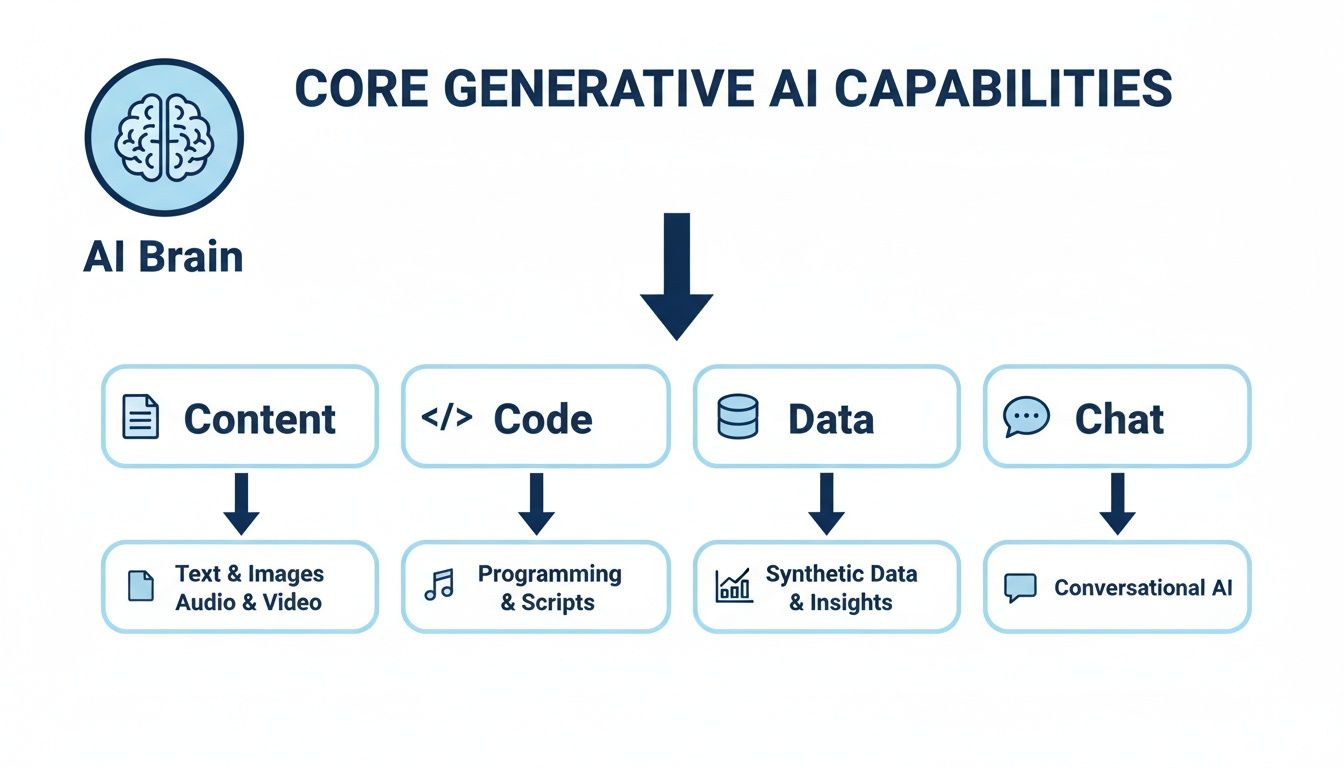
This just shows how a central AI model can branch out to meet very different business needs, whether that’s generating a marketing campaign or having an intelligent conversation with a customer.
Marketing And Sales
Marketing and sales teams are always on the front lines, and generative AI is giving them a whole new set of tools. Their biggest challenge has always been personalizing communication at scale. AI finally makes that a reality.
For marketers, AI can spit out dozens of variations of ad copy, social media posts, or email subject lines in minutes. This makes A/B testing on a massive scale not just possible, but easy. Real-Life Example: Stitch Fix, a personal styling service, uses generative AI to create personalized email subject lines and product recommendations for millions of users, leading to significantly higher engagement and click-through rates.
On the sales side, AI can draft personalized outreach emails by pulling details about a lead’s industry, job title, and past interactions. This frees up reps from the drudgery of admin work so they can focus on what they do best: building relationships and closing deals.
The big shift here is moving from broad, one-to-many campaigns to hyper-personalized, one-to-one conversations with every single customer and prospect. Generative AI makes that level of detail achievable.
Customer Service And Support
Great customer service can make or break a business, but it's expensive and hard to staff. AI-powered chatbots and virtual assistants are changing the equation by offering instant, 24/7 support.
These aren't the clunky, frustrating chatbots of the past. Modern conversational AI understands complex questions, pulls up customer history, and gives genuinely helpful answers. Real-Life Example: KLM Royal Dutch Airlines uses an AI-powered chatbot called BlueBot to handle over 1.5 million customer queries a year, successfully resolving more than 50% of them without human intervention. This frees up human agents for the trickier, more sensitive issues where they’re needed most.
AI can also summarize a long, winding customer conversation in seconds. When a ticket gets escalated, the human agent has instant context, leading to faster resolutions and a much happier customer.
Operations And Product Development
Behind the scenes, generative AI is also fine-tuning core business operations and shrinking product development timelines. Operations teams can use it to generate reports, analyze supply chain data, and even draft internal process documents.
For product and engineering teams, code-generation tools are becoming indispensable partners. They can write boilerplate code, suggest improvements, and even help hunt down bugs. The result? Developers can build, test, and ship new features much more quickly. To see a great example of how these tools fit into a professional workflow, check out our ultimate guide to Microsoft Copilot.
Human Resources And Finance
Even traditionally administrative departments like HR and Finance are finding powerful uses for generative AI.
HR professionals can use AI to write clear, inclusive job descriptions, create onboarding guides, and draft company-wide announcements. It ensures a consistent voice and saves a ton of time on repetitive writing.
In finance, AI can help with complex financial modeling, generate plain-language summaries of quarterly reports, and analyze market trends. By sifting through massive datasets, it can spot anomalies or opportunities a human analyst might miss, leading to smarter, more confident decisions.
Generative AI Use Cases By Business Department
The table below gives a comparative overview of how different business functions can apply generative AI to solve common problems and achieve specific outcomes.
| Business Function | Common Challenge | Generative AI Application | Potential Business Impact |
|---|---|---|---|
| Marketing | Scaling personalized content creation for diverse audiences. | Generating targeted ad copy, email campaigns, and blog posts. | Increased engagement and higher campaign conversion rates. |
| Sales | Time spent on manual prospecting and follow-ups. | Automating the drafting of personalized outreach emails and lead nurturing sequences. | Higher sales productivity and shorter sales cycles. |
| Customer Service | High volume of repetitive customer inquiries and long wait times. | Deploying intelligent chatbots to provide instant answers to common questions. | Reduced operational costs and improved customer satisfaction (CSAT) scores. |
| Product Development | Slow prototyping and development cycles for new features. | Assisting developers with code generation, bug detection, and documentation. | Faster time-to-market for new products and features. |
| Human Resources | Writing consistent job descriptions and onboarding materials. | Generating drafts for job postings, company policies, and employee handbooks. | Improved efficiency and greater consistency in internal communications. |
| Finance | Manual data analysis and report generation. | Creating summaries of financial reports and assisting with predictive modeling. | Better strategic insights and faster, data-driven decision-making. |
As these examples show, generative AI is a profoundly adaptable technology. It offers practical solutions that span the entire organization, helping each department tackle its own unique challenges more effectively.
How to Measure the Real ROI of Generative AI
Once the initial excitement of generative AI wears off, the real work begins. To keep any initiative moving forward, you have to prove its worth. That means looking past flashy demos and tying your AI projects directly to the bottom line.
The trick is to define what success looks like before you even start. Are you trying to slash operational costs? Speed up your sales cycle? Boost customer satisfaction scores? Each of these goals demands its own set of Key Performance Indicators (KPIs).
Without this framework, you're just playing with new tech. With it, you're building a strategic advantage and have the hard data you need to champion these projects and scale what actually works.
Shifting From Cost Center to Value Driver
So, where do you look for the financial impact? Early adopters are seeing the biggest returns by focusing their measurement on four specific areas.
- Efficiency Gains: This is about time. How many hours is your team getting back? Think about the time your marketers save by having AI draft social media posts, or the hours your developers reclaim by automating routine code.
- Direct Cost Savings: This is about money. Track the hard-dollar reductions in your overhead. Maybe you’re spending less on customer support because AI chatbots are handling common questions, or you’ve cut back on freelance content writers.
- Revenue Growth: Connect the dots between AI and sales. Can you show a higher conversion rate from AI-personalized email campaigns? Or track the revenue that came from leads nurtured by an AI sales assistant?
- Improved Customer Experience: This one can feel a bit fuzzy, but metrics like Net Promoter Score (NPS) and Customer Satisfaction (CSAT) are gold. Higher scores almost always lead to better customer loyalty and a higher lifetime value.
A good rule of thumb? Industry data suggests a return of roughly $3.50 for every $1 invested in AI projects. That’s a 3.7x ROI, with about 75% of that value coming from just four key areas: customer operations, marketing and sales, software engineering, and R&D. Discover more insights about GenAI ROI on masterofcode.com.
A Practical Comparison of ROI Metrics
It's easy to get bogged down tracking things that don't matter. A "vanity metric" shows you're busy, but an ROI-focused KPI shows you're making an impact. Here’s a quick look at the difference.
| Business Function | Vanity Metric (Shows Activity) | ROI-Focused KPI (Shows Impact) |
|---|---|---|
| Marketing | Number of AI-generated blog posts published. | 25% increase in organic traffic and lead conversions from AI-optimized content. |
| Sales | Number of personalized emails sent by an AI tool. | 15% shorter sales cycle due to AI-assisted lead nurturing and follow-ups. |
| Customer Service | Total number of chatbot interactions per month. | 30% reduction in human agent handle time and a 10-point increase in CSAT scores. |
| Operations | Number of reports automated by AI. | 40 hours per week saved on manual data entry, freeing staff for strategic analysis. |
By zeroing in on the metrics in that right-hand column, you can build a rock-solid business case that ties every dollar you spend on AI directly to a meaningful business outcome.
Real-World Example: Measuring AI Success at Wayfair
Let's make this tangible. Imagine an e-commerce giant like Wayfair, which implemented a generative AI tool to create product descriptions and marketing copy for its massive catalog.
- The Challenge: Writing unique, engaging descriptions for millions of products was a monumental task, leading to generic copy and missed SEO opportunities.
- The AI Solution: They deployed a proprietary generative AI model to create compelling, brand-aligned descriptions based on product specifications and customer data.
- The Measurement Plan: They tracked key metrics like organic search traffic to product pages, customer engagement (time on page), and conversion rates for AI-enhanced listings.
- The Result: Wayfair reported a significant lift in SEO performance and a measurable increase in conversion rates, demonstrating a clear return on their AI investment by delivering more relevant and persuasive content at an unprecedented scale.
Your Practical Roadmap For Implementing Generative AI

Knowing what generative AI can do is one thing. Actually weaving it into the fabric of your business is another challenge entirely. The secret? Don't try to boil the ocean. A structured, phased approach turns this daunting task into a manageable project with clear milestones and real results.
I always recommend a "crawl, walk, run" approach. It allows your organization to build confidence, prove the value, and learn from small experiments before you commit to bigger investments. Let's walk through what that looks like in practice.
Stage 1: Crawl – Start Small And Focused
Your first move is the most important one: identify a single, high-impact use case. Look for a nagging, recurring problem or a process bottleneck that’s a constant headache for a specific team.
Maybe your customer service team is drowning in password reset tickets. Or perhaps your marketing team just can't keep up with the demand for social media posts.
By picking a well-defined problem, you give yourself a clear target. It makes measuring success simple and helps you score a quick win—which is exactly what you need to get leadership excited about what's next.
- Real-Life Example: An e-commerce business noticed its two-person marketing team spent 10 hours a week just writing product descriptions. Their first AI project? Use a tool to draft these descriptions. This cut the work down to two hours of review and editing. That's a clear, measurable win.
Stage 2: Walk – Test And Learn
Once you have your target, it’s time to pick the right tools and get your team ready. You don't need to build a complex AI model from the ground up. The market is filled with powerful, user-friendly platforms you can get up and running quickly.
Comparing Tooling Options
| Approach | Best For | Pros | Cons |
|---|---|---|---|
| Off-the-Shelf SaaS | Small to mid-sized businesses and pilot projects. | Low initial cost, easy to set up, no technical expertise required. | Limited customization, data may be processed by a third party. |
| Custom Models | Large enterprises with unique needs and sensitive data. | Highly tailored to specific workflows, full data control and security. | High development cost, requires specialized AI talent, long implementation time. |
With a tool selected, run a pilot project. This is just a small-scale test with a handful of users. Your goal is to gather data, measure performance, and collect honest feedback. What worked? What fell flat? This is where you learn what actually moves the needle for your business.
At this stage, people are just as important as the technology. Focus on upskilling your employees. Training them on how to use new tools effectively and ethically turns fear and skepticism into confident adoption.
Stage 3: Run – Scale And Integrate
After a successful pilot, you'll have the data—and the success story—you need to justify a wider rollout. The "run" phase is all about scaling what works. This means integrating the AI solution more deeply into your daily workflows and expanding it to other teams or departments.
Now is also the time to establish clear governance. Create simple AI usage policies that cover the non-negotiables: data privacy, fact-checking, and keeping your brand voice consistent. A "human-in-the-loop" process, where a person always validates AI output before it goes public, is essential for maintaining quality and trust.
For teams looking to get their feet wet, you can master generative AI in just hours with Microsoft's free beginner series. It's a fantastic starting point for employees at any level. After all, successful scaling depends on a workforce that feels confident and capable with these powerful new tools.
Navigating The Risks And Governance Of AI In Business
Jumping into generative AI for your business is exciting, but you have to go in with your eyes wide open. To build something that lasts, you've got to wrestle with the real risks and ethical questions this tech brings to the table. Getting this right from the start builds trust and makes sure your AI efforts don't backfire.
Simply ignoring these issues is not an option. The biggest headaches most companies run into are around data privacy, the AI's tendency to make things up (often called "hallucinations"), and tricky intellectual property rights. If you tackle governance proactively, you can turn these potential landmines into a competitive edge built on responsibility.
Establishing Clear Guardrails
Your first move should be creating a straightforward AI usage policy. Think of it as a simple, practical rulebook for your team. It should spell out what's okay to do, how to handle sensitive data, and when a human needs to step in and check the AI's work. This sets the tone for smart, safe innovation.
Governance isn’t about pumping the brakes on innovation. It's about making it safer and more effective. A clear policy actually gives your team the confidence to experiment within safe boundaries, heading off costly mistakes before they ever happen.
A non-negotiable part of this policy is a human-in-the-loop review. This just means a real person with the right expertise has to sign off on anything the AI creates before it sees the light of day, especially if it's going out to customers. This one step is your best defense against embarrassing errors and protects your brand’s quality. It's also a key part of telling AI-generated text from human writing.
Key Risks And How To Address Them
To navigate this new terrain, you need a clear map of the specific risks and practical ways to deal with them. A solid governance plan addresses each of these challenges head-on.
| Risk Category | Potential Problem | Mitigation Strategy |
|---|---|---|
| Data Privacy | Sensitive customer or company info gets fed into a public AI model, exposing it to the world. | Stick to enterprise-level AI tools that guarantee data protection. Drill into your team that confidential data never goes into public prompts. |
| Factual Inaccuracy | AI models can state incorrect information with absolute confidence. These are "hallucinations." | Enforce a mandatory human review process for all external-facing content to fact-check and verify every detail. |
| Copyright Concerns | An AI trained on the entire internet might spit out content that violates someone else's copyright. | Use AI platforms that offer legal protection (indemnification) and are transparent about their training data. Always attribute and license assets correctly. |
| Regulatory Compliance | Running afoul of data laws like GDPR, which can come with hefty fines. | Keep up with regulations. For any business using generative AI, a solid understanding is crucial; this practical guide to AI GDPR compliance is a great resource. |
By tackling these risks directly, you can innovate with confidence. You're building a framework for responsible AI that lets you tap into its incredible power without putting your business in jeopardy.
Frequently Asked Questions About Generative AI
Here are answers to the most common questions business leaders have when exploring generative AI.
1. What’s the difference between generative AI and traditional AI?
Traditional (or analytical) AI is designed to recognize patterns and make predictions based on existing data. Think of it as an expert analyst. Generative AI, in contrast, creates entirely new content—text, images, code—that didn't exist before. It's a creator, not just an analyst.
2. Is generative AI expensive to implement?
It doesn't have to be. While building a custom model from scratch is costly, many businesses start with affordable off-the-shelf SaaS tools (from $20/month per user). The key is to start small with a clear use case to prove ROI before scaling your investment.
3. Do I need a team of AI experts to use generative AI?
No. One of the biggest shifts is the rise of user-friendly platforms that require little to no technical expertise. Marketing, sales, and HR teams can use these tools directly to automate tasks without writing a single line of code.
4. How can I ensure the AI's output is accurate and on-brand?
The "human-in-the-loop" approach is essential. Always have a qualified team member review, edit, and approve AI-generated content before it goes public. Additionally, fine-tuning models with your brand guidelines and style examples helps ensure consistency.
5. What is the biggest risk of using generative AI in my business?
Data privacy is a primary concern. Feeding sensitive customer or proprietary data into public AI models can lead to serious breaches. The best practice is to use enterprise-grade tools with strong data security policies and to create clear internal guidelines on what data can and cannot be used.
6. Will generative AI replace jobs in my company?
The current consensus is that generative AI is more likely to augment human roles rather than replace them. It excels at handling repetitive, time-consuming tasks, which frees up employees to focus on strategic thinking, complex problem-solving, and creativity—areas where humans still far outperform AI.
7. What's the best first step to take when implementing generative AI?
Start with a small, low-risk pilot project that solves a specific, measurable problem. For example, automate the creation of social media post drafts for your marketing team. A quick win builds momentum and demonstrates value to stakeholders.
8. How is generative AI different from automation?
Traditional automation follows pre-programmed, rule-based instructions (if X, then Y). Generative AI is more dynamic; it can understand context, handle ambiguity, and create novel solutions to problems it hasn't been explicitly programmed to solve. It's a more flexible and creative form of automation.
9. Can generative AI help with internal operations, not just customer-facing tasks?
Absolutely. Some of the highest ROI applications are internal. It can be used to summarize long meeting transcripts, draft internal policies, generate analytical reports from raw data, and help developers write and debug code, boosting productivity across the entire organization.
10. How quickly can I expect to see a return on investment (ROI)?
This depends on the use case. For efficiency-focused projects like content automation, you can see ROI in weeks through saved labor hours. For revenue-generating applications like personalized marketing, it might take a full quarter to measure the impact on conversion rates and sales cycles. Tracking the right KPIs from day one is critical.
Previous Post
Next Post