
How to Verify AI Meeting Notes Before Sharing
Quick answer. Before sharing AI meeting notes, check each decision and action against an authorized record or the people involved. Confirm the owner, deliverable, deadline and conditions. Mark unresolved items as pending, review recipients and document permissions, then send a dated version that makes corrections easy to trace.
An AI recap can turn a conditional offer into a firm deadline or assign a task to the person who merely asked about it. The wording may sound natural enough to pass a quick read. The review below helps students, volunteers and teams worldwide turn a recap into a usable record before anyone acts on it.
This guide uses current Microsoft Teams, Google Meet and Zoom documentation reviewed November 18, 2026. Its examples are fictional. The review method and worksheet are original Everyday Next editorial aids. Feature access and controls vary by account, administrator settings and region. Follow the rules for your group and location when capturing or sharing a meeting.
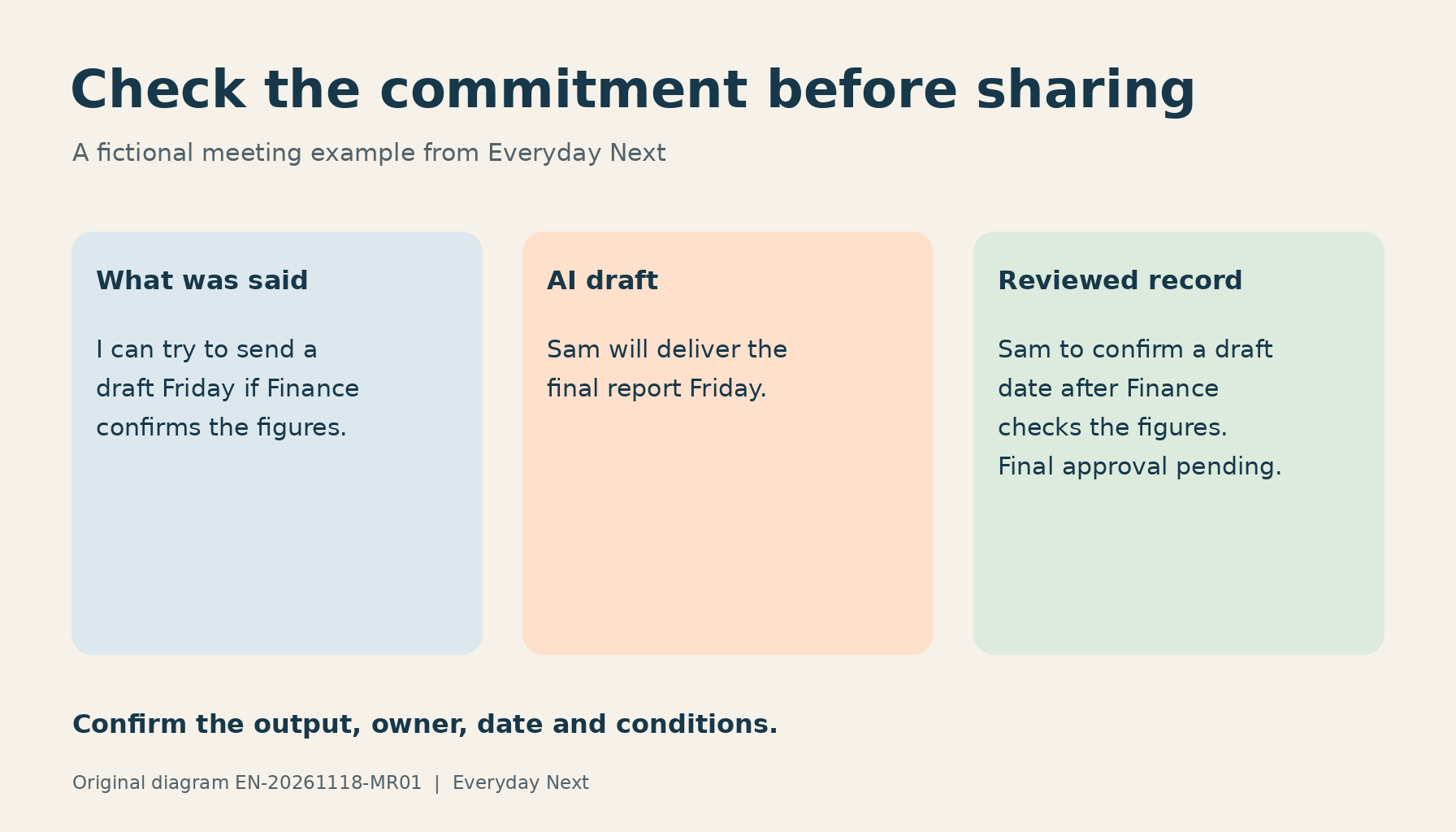
Original diagram by Everyday Next, artwork EN-20261118-MR01. The featured diagram illustrates the fictional example explained below.
Why AI meeting notes need a review
A transcript attempts to represent spoken words. A summary selects and compresses them. A task list goes further by interpreting what someone agreed to do. Each stage can introduce an error, even when the overall topic is correct. Microsoft’s recap documentation warns that generated content can be inaccurate, incomplete or inappropriate.
There is also less source material to inspect in some workflows. Microsoft’s October 30, 2026 update announced that intelligent recap without a saved transcript had rolled out worldwide in October. Its support page explains that the feature generates a summary from meeting audio, stores a summary document and depends on licensing and administrator policy. A recap can therefore remain available even when you cannot open a saved transcript.
The durable task is the same across products. Establish what was agreed, preserve uncertainty, and send it to the right people. For broader evaluation of claims and evidence, use the critical-thinking guide. For choosing software, see the AI productivity tools guide.
Start with the actions that could change someone’s work
Read the recap once for context, then inspect the lines that could cause a person to commit time, spend money, share information or change a plan. Give particular attention to numbers, dates, names, approvals and dependencies. A routine discussion point can receive a lighter check than a statement authorizing a purchase.
- Identify the claim. Copy the exact decision or proposed action into your review notes.
- Find its basis. Check the surrounding discussion in an authorized transcript, recording, contemporaneous notes or agreed document.
- Resolve the commitment. Confirm who agreed to what, when it is due, and any conditions.
- Choose a status. Use confirmed, needs confirmation, corrected or removed. Keep the basis for the change.
- Check the audience. Review both the recipients and the file’s permissions before sending.
When the record is incomplete, ask the named person or meeting owner. An AI summary of another AI summary adds no independent evidence. You can still publish an accurate limited record by stating which items need confirmation and who will resolve them.
A worked example of a deadline that changed meaning
Fictional discussion. Sam says, “I can try to send a draft Friday if Finance confirms the figures. We still need approval before the final report goes out.” Priya replies, “Please check with Finance and let us know whether Friday is possible.”
AI draft. “Sam will deliver the final report on Friday. Priya approved the timeline.”
The draft has changed the deliverable from a draft to a final report, removed a dependency and invented approval. An accurate review would retain those distinctions.
Reviewed record. Sam will check with Finance and confirm whether a draft can be sent Friday. The final report still needs approval. The draft target and approver remain pending confirmation.
If the task system requires a deadline, create a task to confirm the delivery date. Do not enter Friday as an accepted final-delivery date just to fill the field. Once Sam confirms a date, update the record and identify the change. The project-management tools comparison can help you choose where to keep owners, dependencies and status visible.
Use this six-field review worksheet
Copy one row for every consequential action or decision. The worksheet is deliberately simple so it can live in a document, spreadsheet or task comment. Avoid putting confidential meeting material into a new service merely to complete it.
| Field | What to record | Example |
|---|---|---|
| Draft claim | The exact statement you are checking. | Sam will deliver the final report Friday. |
| Evidence | Authorized source and location, or the person asked. | Discussion notes, paragraph 8. Sam asked to confirm. |
| Owner and output | The agreed person and concrete deliverable. | Sam to confirm feasibility of a draft. |
| Timing and conditions | Full date, time zone if needed, dependencies and approval. | Friday target depends on Finance. Final approval unresolved. |
| Status | Confirmed, needs confirmation, corrected or removed. | Corrected. Draft date needs confirmation. |
| Sharing and follow-up | Recipients, permission check, reviewer and next check. | Project team only. Priya to seek confirmation. |
Keep the original AI draft according to your retention rules and distinguish it from the reviewed version. A small change log can record the date, changed line, reason and person confirming it. You do not need a numeric confidence score. A clear unresolved status gives the next reader something they can act on.
What if there is no transcript?
Use records you are authorized to access, such as meeting notes, an approved specification or a message from the person assigned the action. Treat memory as a lead for confirmation. Ask a narrow question that includes the output, date and condition, rather than asking everyone to approve the entire recap.
“Please confirm whether you agreed to send a draft on Friday, subject to Finance confirming the figures. Who needs to approve the final version?”
If nobody can confirm the item, leave it pending or remove the unsupported commitment. For a consequential approval, follow the group’s required approval process. The absence of a transcript should not be solved by secretly recording future meetings or exporting restricted material.
NIST’s Generative AI Profile describes risks from confidently generated false content and overreliance on automated outputs. In practice, preserve the distinction between a helpful draft and a commitment accepted by the people who must carry it out.
Check product sharing settings before forwarding
The controls below describe documented behavior checked on November 18, 2026. Review your actual account settings before using them. Availability can change and an administrator may restrict options.
| Platform | Documented behavior | Review task |
|---|---|---|
| Teams | Recap without transcription can create a summary document in the organizer’s OneDrive. It expires according to administrator settings. | Find the correct recap and confirm access and retention with the organizer. |
| Google Meet | Hosts can select recipients for notes. “Invited guests” can include people who did not attend. | Check the recipient selection and the generated document’s access. |
| Zoom | Hosts can share summaries. Depending on settings, summaries can appear in email and the meeting’s chat. | Check where the summary went and who received it before sending another copy. |
Notifications that note-taking is active help participants understand capture. They do not determine every legal or organizational requirement. Check applicable consent and handling rules with the person responsible for them. Review sensitive details and distribution as separate tasks from factual accuracy. A correct statement can still reach the wrong audience.
Where file copies and permissions have become hard to track, the digital declutter guide offers a broader way to review ownership and access.
Send a reviewed record and correct earlier copies
Put the meeting date and review status near the top. List confirmed decisions, actions with accepted owners, and unresolved questions. Use full calendar dates when “next Friday” could be ambiguous, and specify the time zone for deadlines across countries. Ask the affected person to confirm a disputed commitment before it becomes a dependency for someone else.
If a wrong recap has already circulated, correct the same channel and any task created from it. Identify the changed commitment and link to the authoritative version. Merely editing your private copy leaves other people working from the old instruction. For difficult choices that remain after the facts are settled, use the decision-making toolkit.
Frequently asked questions
Can I trust AI meeting notes if the transcript is accurate?
Check the summary’s interpretation as well. A correct transcript can still be compressed into the wrong owner, date or decision. Read enough surrounding context to see conditions and later corrections.
Can another AI verify the recap?
It can help identify statements to inspect, especially names, numbers and commitments. Provide only authorized material and check the suggested changes against evidence. Two matching AI answers can share the same error.
Should I ask everyone to approve every line?
Match the review to the consequences. Ask named owners about their commitments and seek the required approver for approvals. Routine context may only need a quick factual check.
What if participants disagree about what happened?
Record the disagreement and ask the meeting owner to resolve the decision. Keep disputed commitments pending. A confident summary should not decide whose recollection becomes binding.
Does deleting the transcript delete every summary?
Do not assume that related records share the same lifecycle. Check the product’s current documentation and your administrator’s policy for recaps, documents, emails, chats and exported copies.
What is the minimum useful action item?
It identifies an accepted owner, a concrete output and agreed timing or a next step to confirm timing. Include dependencies and approvals when they affect delivery.
Sources and review scope
- Microsoft, October 2026 Copilot updates, published October 30
- Microsoft Support, intelligent recap without transcription
- Microsoft Support, recap and AI accuracy limits
- Google Meet Help, Take notes for me
- Zoom Support, Using Meeting Summary with AI
- NIST AI 600-1, Generative Artificial Intelligence Profile, July 2024
This is a documentation-based guide with fictional examples. The worksheet has no automatic verification or legal-approval function. Review the commitments that matter, resolve the remaining questions and check access before sharing.
Previous Post
Next Post