10 Best Habit Tracking Apps for 2026 (Free & Paid)
Last reviewed: September 25, 2026. Habit trackers work best when they make the action you want to repeat easy to record. The right choice depends less on the longest feature list and more on your devices, motivation style, privacy needs, and tolerance for subscriptions.
This guide compares 10 dedicated habit-tracking apps plus the two official app stores where iPhone and Android users can verify current compatibility, privacy disclosures, user feedback, and in-app pricing. We reviewed current official product pages and store listings, supported platforms, pricing models, tracking methods, data controls, and the practical tradeoffs that matter after the first week. We do not accept payment for placement in this ranking.
\n
Want to begin without installing another app? Use the free Habit Plan Generator and Tracker to create a cue-based plan, choose realistic practice days, and save check-ins privately in your browser.
Best habit tracking apps: quick picks
| Need | Best starting point | Why |
|---|---|---|
| Best for Apple users | Streaks | Fast logging, widgets, Apple Watch, and Health integration |
| Best free Android option | Loop Habit Tracker | Free, open source, ad-free, and usable without an account |
| Best across devices | Habitify | Apps for major mobile and desktop platforms with synced progress |
| Best for gamification | Habitica | Turns habits and tasks into an RPG-style reward system |
| Best all-in-one planner | TickTick | Combines habits, tasks, calendar planning, and focus tools |
How to use this guide: shortlist two options, verify the current price in your regional app store, and test one small habit for seven days before paying. Prices and features can change by country and platform, so the official listing linked in each section is the final source of truth.
How to verify any habit app before installing it
App-store listings are verification tools, not habit trackers. Before installing an app, check the most recent update date, supported devices, in-app purchases, privacy disclosures, account-deletion options, and recent reviews in the Apple App Store or Google Play. A high rating is useful context, but recent reviews often reveal current syncing, subscription, or battery problems.
If an app does not fit your goals, start with a paper checklist and use our guides to setting SMART goals and improving focus and concentration. The tracking method matters less than consistently recording the behaviour. If motivation is the bigger obstacle, review these personal-growth strategies before adding more software.
1. Habitify
For users who operate across multiple devices, Habitify stands out as a powerful, cross-platform solution. Its website is the central hub for understanding its philosophy, exploring features, and signing up for an account that syncs seamlessly across iOS, Android, macOS, watchOS, and the web. This platform-agnostic approach is Habitify’s core strength, ensuring your habit data is consistent and accessible whether you are at your desk or on the go. The site clearly details its free and premium offerings, providing a transparent entry point for new users.
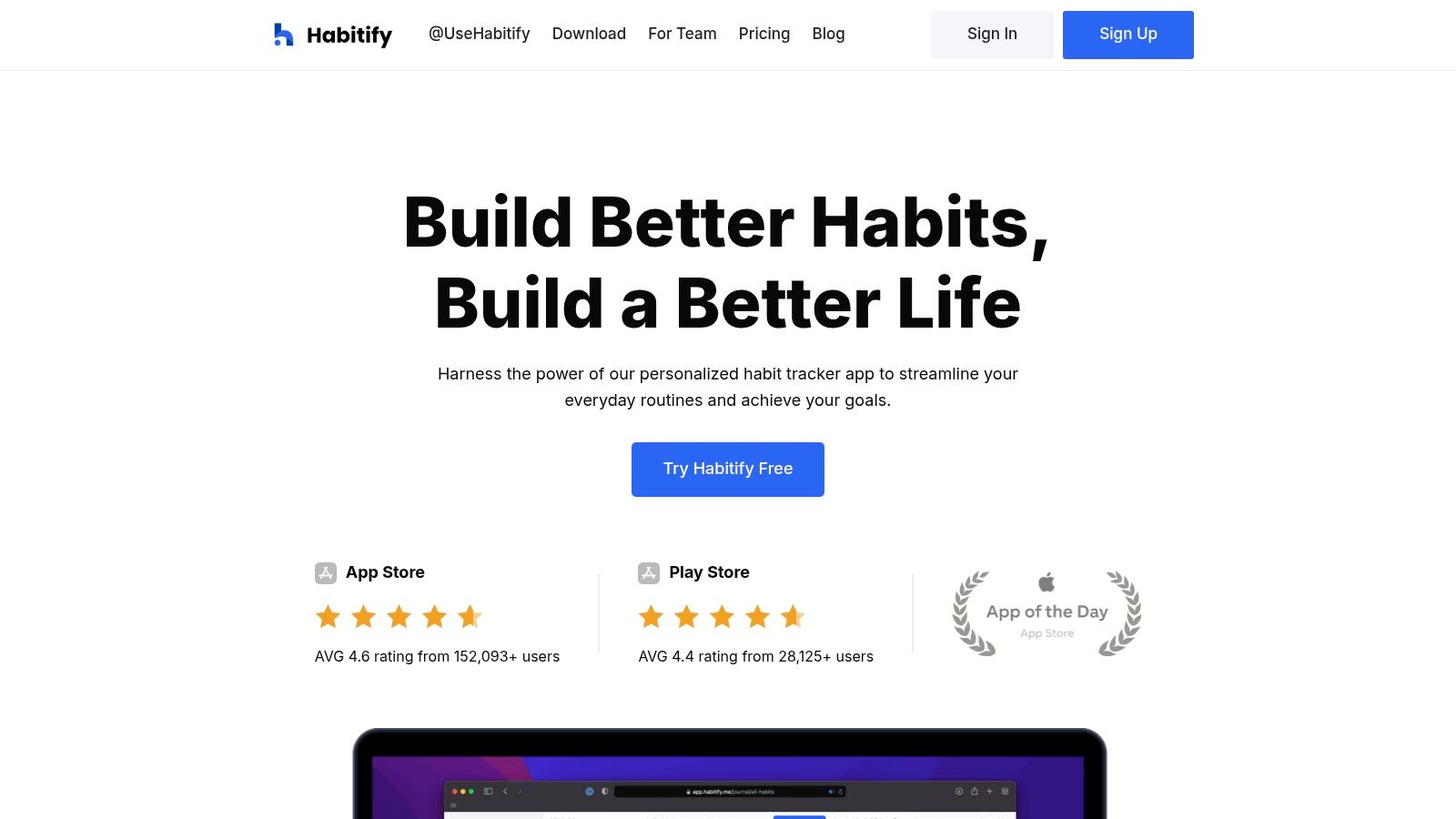
Habitify excels by combining a clean, data-driven interface with powerful automation and integration capabilities. The platform is designed not just for tracking but for analysis, offering detailed charts and statistics to help you understand your progress. Its integrations with Apple Health, Google Calendar, and automation tools like Zapier allow it to fit neatly into your existing digital life. For those looking to build momentum, this is one of the best habit tracking apps for creating a connected and automated system.
Platform Highlights
- True Cross-Platform Sync: Access and update your habits seamlessly on the web, desktop (macOS), and mobile (iOS/Android), including Apple Watch.
- Powerful Integrations: Connect with Apple Health, calendars, and use Zapier or IFTTT for advanced automation workflows.
- Data-Rich Insights: Provides detailed journals, charts, and yearly reviews to visualize your progress and identify patterns.
- Advanced Reminders: Go beyond simple notifications with features like location-based reminders and prompts for habit stacking. You can learn more about how to effectively build routines on everydaynext.com.
Our Take: Habitify is the ideal choice for data-oriented individuals who want a single, powerful system that works everywhere. Its web and desktop clients are just as robust as its mobile apps, a rarity in this category.
Real-Life Example: A freelancer uses a Mac for work, an Android phone for personal use, and an iPad for reading. With Habitify, they can log "Review daily tasks" on their Mac in the morning, check off "Read 20 pages" on their iPad at lunch, and get a reminder to "Go for a walk" on their Android phone in the evening. All data syncs perfectly across every device.
| Feature | Details |
|---|---|
| Availability | Web, iOS, Android, macOS, watchOS |
| Pricing Model | Free (up to 3 habits); Premium (monthly, annual, lifetime subscription) |
| Unique Offering | Comprehensive cross-platform parity and deep integration with automation tools |
| Best For | Tech-savvy users who need their habit tracker to work on all their devices |
2. Streaks
For those deeply invested in the Apple ecosystem, Streaks is a beautifully designed, award-winning app that focuses on one core concept: don't break the chain. Its entire philosophy is built around maintaining daily streaks for your desired habits. The official website serves as a detailed showcase, explaining its powerful features and design ethos before directing users to the App Store for a one-time purchase, a refreshing model in a subscription-heavy market.

This app excels by leveraging native Apple technologies to their fullest potential. Its standout feature is its seamless integration with the Apple Health app, which can automatically track habits like walking a certain number of steps or completing mindfulness minutes. With highly customizable widgets for your home screen and a robust, interactive Apple Watch app, Streaks makes logging progress effortless and visually satisfying. You can track up to 24 tasks at once, ensuring it can handle both simple and complex routines.
Platform Highlights
- Apple Health Integration: Automatically logs habits linked to Health data, such as distance walked, calories burned, or sleep duration, reducing manual entry.
- Polished Design: A clean, minimalist interface with extensive customization options, including themes and icons, makes for a delightful user experience.
- Powerful Widgets: Offers some of the best-looking and most functional widgets for iOS, allowing you to view and complete tasks directly from your home screen.
- One-Time Purchase: A clear, upfront cost provides full access to all features on iOS, iPadOS, and watchOS without recurring subscription fees.
Our Take: Streaks is the gold standard for a native-feeling habit tracker on Apple devices. Its one-time purchase model offers incredible value, and its deep integration with Apple Health makes it one of the smartest and most automated options available.
Real-Life Example: Sarah wants to walk 10,000 steps and practice 5 minutes of mindfulness daily. She sets these up in Streaks and links them to Apple Health. Now, she doesn't need to manually log anything. Her iPhone automatically tracks her steps, and her Apple Watch logs her meditation session. The Streaks widget on her home screen updates her progress in real-time.
| Feature | Details |
|---|---|
| Availability | Exclusively on iOS, iPadOS, macOS, watchOS |
| Pricing Model | One-time purchase per platform (e.g., one for iOS/watchOS, separate for macOS) |
| Unique Offering | Automatic habit tracking via deep Apple Health integration |
| Best For | Apple users who value a simple, visually appealing design and a "buy-it-once" pricing model |
3. Strides
Strides is a highly flexible and powerful goal and habit tracker designed exclusively for the Apple ecosystem. It moves beyond simple binary (yes/no) habit tracking by offering multiple ways to measure progress, making it one of the best habit tracking apps for users with diverse or complex goals. Whether you want to build a streak, hit a target number, track an average over time, or complete a multi-step project, Strides provides a specific tracker type to match your objective. This adaptability makes it suitable for anything from drinking more water to saving a specific amount of money or finishing a major project.
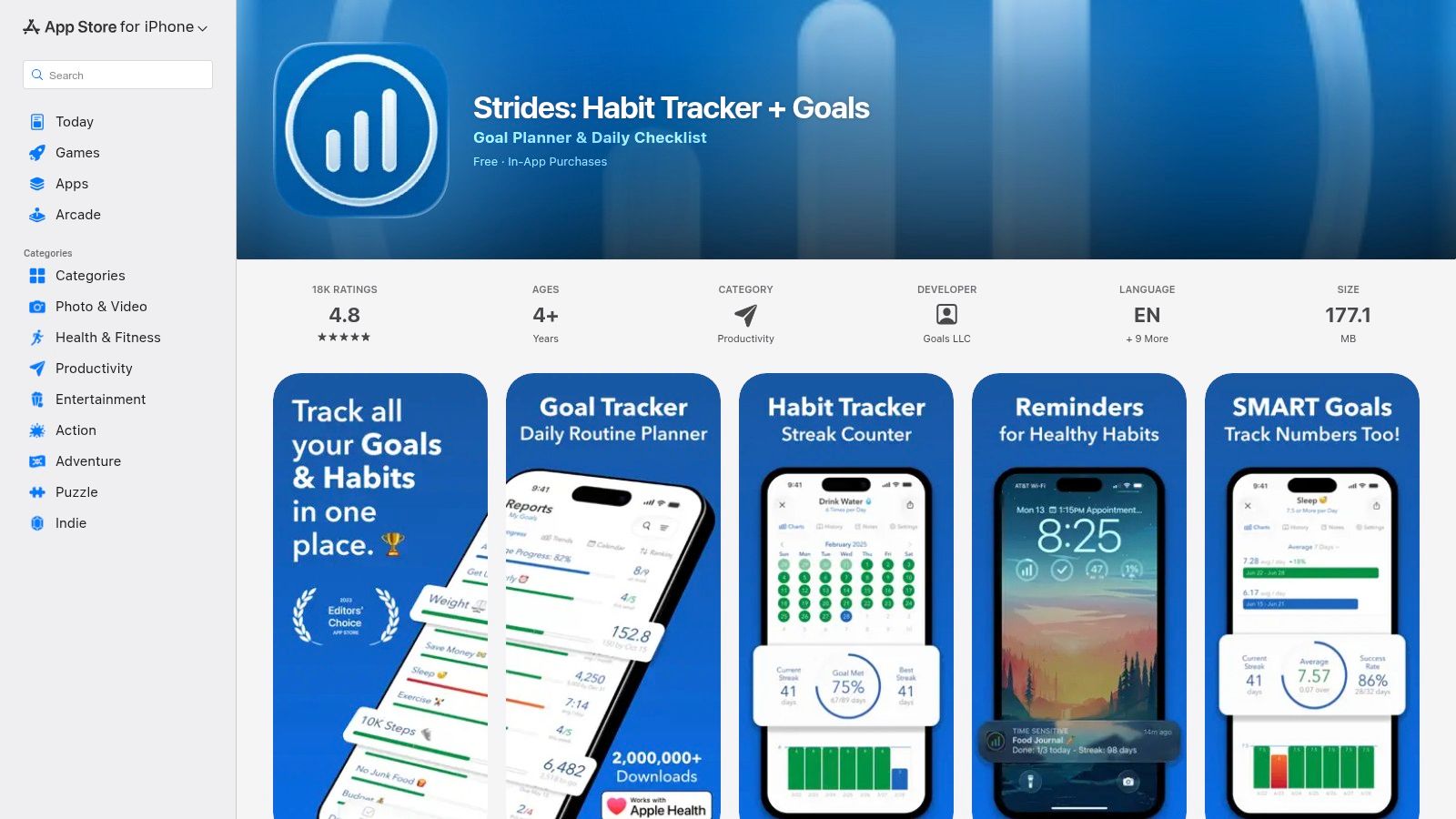
The platform’s strength lies in its detailed analytics and reporting, which are presented through clean, easy-to-understand charts. Users can see their progress on a calendar, view success rates, and monitor streaks to stay motivated. With over 150 built-in templates, getting started is quick and intuitive. This thoughtful design helps users connect daily actions to their larger ambitions, which is a key component of cultivating a growth mindset for lifelong success. The seamless sync across iPhone, iPad, Mac, and Apple Watch ensures your progress is always up to date.
Platform Highlights
- Four Flexible Tracker Types: Track habits with Streaks (good or bad), Targets (reach a goal by a date), Averages (monitor over time), and Milestones (complete projects).
- Comprehensive Reporting: Detailed charts and graphs show success rates, streaks, and progress calendars to provide deep insights into your performance.
- Extensive Template Library: Get started instantly with more than 150 templates for common goals related to health, finance, productivity, and more.
- Full Apple Ecosystem Integration: Enjoy seamless syncing across all your Apple devices, including robust Apple Watch support and Apple Health integration.
Our Take: Strides is the ideal choice for data-driven individuals who want more than a simple streak counter. Its multiple tracker types and powerful analytics provide the flexibility needed to monitor virtually any kind of goal.
Real-Life Example: Mark has multiple goals: save $5,000 for a vacation by December (Target), work out an average of 4 times per week (Average), read every day (Streak), and finish a work project with 5 key steps (Milestones). Strides allows him to track all of these different goal types in one app, each with its own specific progress chart.
| Feature | Details |
|---|---|
| Availability | Exclusively on iOS, iPadOS, macOS, watchOS |
| Pricing Model | Freemium; Strides Plus subscription required for unlimited trackers and advanced features |
| Unique Offering | Four distinct tracking methods (Streak, Target, Average, Milestone) in one app |
| Best For | Apple users who need a flexible, all-in-one system for tracking varied and complex goals |
4. Loop Habit Tracker
For Android users who prioritize privacy, simplicity, and a no-cost experience, Loop Habit Tracker is an exceptional choice. This open-source application stands out by being completely free, with no ads, no premium features behind a paywall, and no data collection. It is a purpose-built tool designed for one thing: helping you build and maintain good habits through a clean, intuitive interface without unnecessary distractions. Its core philosophy is to provide a powerful, offline-first tool that respects user privacy.
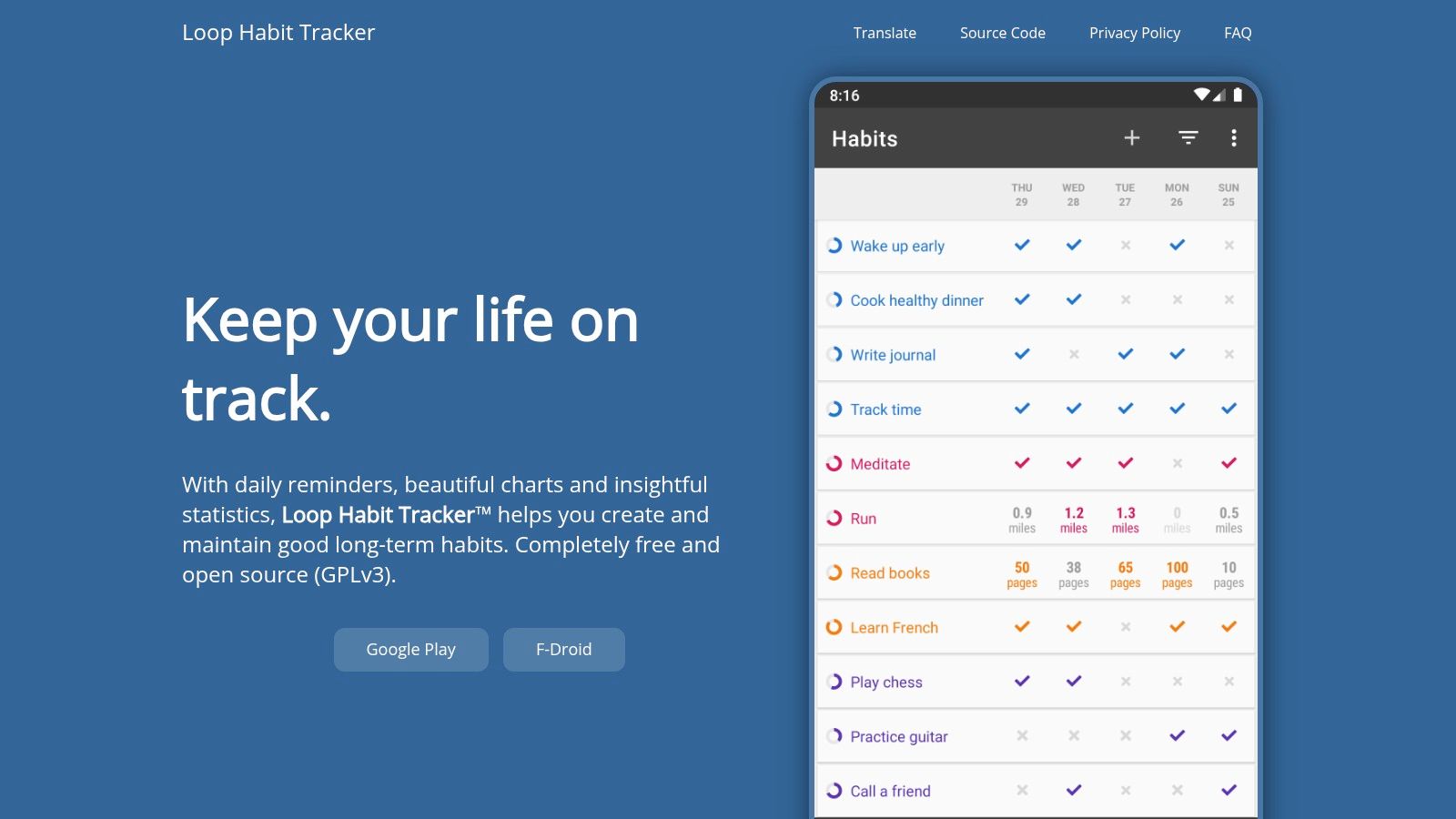
The app excels at presenting your progress with insightful statistics and graphs, helping you understand your consistency over time. It calculates a "Habit Score" that provides a more nuanced view of your performance than a simple streak count, which can be demotivating if broken. Features like flexible scheduling (e.g., 3 times a week), powerful reminders, and home screen widgets make it a robust and practical companion for daily use.
Platform Highlights
- Completely Free & Open Source: The app is free under the GPLv3 license, ensuring it will never contain ads or intrusive trackers.
- Privacy-First Design: It requires no account, operates fully offline, and does not collect or transmit any of your personal data.
- Insightful Statistics: Go beyond simple streaks with detailed graphs, calendars, and a unique strength score for each habit.
- Clean, Minimalist UI: The user interface is straightforward and clutter-free, making it easy to check off habits and view your progress quickly.
Our Take: Loop Habit Tracker is the best habit tracking app for privacy-conscious Android users. Its commitment to being free, open-source, and offline-first is a refreshing alternative to the data-driven models of many competitors.
Real-Life Example: A student wants to track study sessions without ads or subscriptions. They install Loop, set a habit for "Study 1 hour" for 5 days a week, and add a widget to their home screen. The app never asks for an email address or personal info. After a month, they can see a detailed graph showing their consistency and "Habit Score," all stored locally and privately on their phone.
| Feature | Details |
|---|---|
| Availability | Primarily Android (available on Google Play and F-Droid) |
| Pricing Model | Completely free; no ads, in-app purchases, or subscriptions |
| Unique Offering | A 100% free, open-source, and private habit tracker with zero data collection |
| Best For | Android users seeking a simple, powerful, and completely private tracker |
5. Habitica
For those who find traditional checklists uninspiring, Habitica transforms personal improvement into a role-playing game (RPG). It’s a gamified task manager that turns your habits, daily goals, and to-do lists into monsters to conquer and quests to complete. Instead of just checking a box, you earn experience points (XP), gold, and mana for completing tasks, allowing your custom avatar to level up, unlock gear, and even collect pets and mounts. This unique approach makes it one of the best habit tracking apps for users motivated by rewards and community.
Habitica thrives on social accountability through its Party and Guild systems. You can team up with friends to go on quests, where failing to complete your daily tasks can cause damage to the entire party. This shared responsibility adds a powerful layer of external motivation. The platform is accessible via its website and dedicated mobile apps, offering a robust free version that includes all core mechanics, with an optional subscription for bonus content.
Platform Highlights
- Gamified Motivation: Applies RPG elements like XP, gold, customizable avatars, and collectible items to make habit-building engaging and fun.
- Social Accountability: Join parties with friends to battle monsters together, where individual success or failure impacts the whole group.
- Three Task Categories: Organizes goals into Habits (positive/negative), Dailies (repeatable tasks), and To-Dos (one-off tasks) for comprehensive life management.
- Community and Events: Active guilds and site-wide challenges provide a supportive community and fresh content to keep users engaged long-term.
Our Take: Habitica is an exceptionally creative solution for combating procrastination. It excels for those who love games, fantasy themes, and community-driven motivation, but its feature-rich, gamified interface may feel overly complex for users seeking a minimalist tracker.
Real-Life Example: A group of friends wants to motivate each other to exercise. They form a "Party" in Habitica and start a "Quest" to defeat a monster. Each day they complete their "Daily" task of exercising, they damage the monster. If someone misses a day, the whole party takes damage. This shared goal turns a solo chore into a collaborative game.
| Feature | Details |
|---|---|
| Availability | Web, iOS, Android |
| Pricing Model | Free; optional subscription for exclusive items and features ($5/mo) |
| Unique Offering | Deep RPG mechanics with social quests for collaborative accountability |
| Best For | Gamers, students, and anyone needing a fun, reward-based system to stay motivated |
6. Way of Life
Way of Life is a classic and highly effective habit tracker designed around one core principle: speed. For those who want to log their daily progress without getting bogged down in complex features, this app offers a streamlined yes/no system. Its interface is built for a quick, at-a-glance overview, using a color-coded chain system that immediately shows your streaks, progress, and areas needing improvement. The official website serves as a straightforward hub, explaining the app's philosophy and directing iOS users to the App Store.
The app's strength lies in its visual feedback. It generates simple yet powerful bar charts and trend lines, allowing you to see your performance over weeks, months, or even years. This visual data makes it one of the best habit tracking apps for identifying long-term patterns. Users can also add notes to each entry, turning a simple log into a rich journal. This feature is particularly useful for tracking contextual details that influence your habits, a practice often recommended in guides covering mental health and wellness apps.
Platform Highlights
- Rapid Logging: The yes/no/skip system minimizes friction, making daily check-ins take just a few seconds.
- Powerful Visualizations: Simple bar charts and trend lines provide a clear, long-term perspective on your consistency and progress.
- Journaling Capability: Add optional notes to any daily entry to record thoughts, challenges, or successes related to a specific habit.
- iOS Integration: Supports Siri Shortcuts, allowing for hands-free logging and updates.
Our Take: Way of Life is the ideal choice for users who value speed and simplicity over gamification. Its no-nonsense approach to data visualization provides clear, actionable feedback without unnecessary distractions.
Real-Life Example: Alex wants to track whether he eats junk food. He sets this up as a "bad" habit. Each day, he opens the app and taps either red (ate junk food) or green (did not). After a month, he looks at the trend chart and sees he is most likely to eat junk food on Fridays, giving him a specific pattern to address. The whole process takes less than 5 seconds a day.
| Feature | Details |
|---|---|
| Availability | iOS (iPhone, iPad, Apple Watch) |
| Pricing Model | Free (for up to 3 habits); Premium (one-time purchase for unlimited habits) |
| Unique Offering | A fast, color-coded "chains" system for immediate visual feedback |
| Best For | Individuals who want a quick, data-driven overview of their habits without complex features |
7. HabitMinder
HabitMinder focuses specifically on health and wellness, offering a guided approach for users looking to build positive physical and mental routines. Instead of starting with a blank slate, the app comes preloaded with over 50 positive habits, such as hydration, stretching, breathing exercises, and workouts. This makes it an ideal choice for beginners who want structure and ideas for improving their well-being without feeling overwhelmed by setup. The platform is designed to be a gentle, persistent companion on your health journey.
The platform’s strength lies in its simplicity and focus on actionable, small activities. For example, the "breathing" habit doesn't just track if you did it; it launches a guided mini-session directly within the app. This integration of micro-activities reduces friction and makes it easier to complete a task the moment you are reminded. With strong support for iOS widgets and the Apple Watch, HabitMinder excels at providing timely, actionable prompts that integrate seamlessly into a user's daily life.
Platform Highlights
- Prebuilt Wellness Habits: Get started instantly with over 50 curated health habits, from drinking water and taking vitamins to meditating and doing pushups.
- Guided Micro-Activities: Many habits include short, guided sessions (like breathing exercises) that can be completed directly within the app.
- Strong Notification System: Highly customizable reminders and persistent notifications help ensure you never miss a habit.
- Wearable Integration: A robust Apple Watch app allows for quick check-ins, progress tracking, and session completion right from your wrist.
Our Take: HabitMinder is one of the best habit tracking apps for anyone whose primary goal is physical or mental wellness. Its pre-built suggestions and guided mini-activities remove the guesswork, making it perfect for beginners.
Real-Life Example: Someone wants to improve their mindfulness but doesn't know where to start. They download HabitMinder and select the pre-built "Breathing" habit. At 10 AM, a reminder pops up on their Apple Watch. They tap it, and the watch guides them through a 1-minute breathing exercise, automatically logging it as complete.
| Feature | Details |
|---|---|
| Availability | Primarily on iOS, iPadOS, watchOS; an Android version is available |
| Pricing Model | Freemium (limited habits); Premium subscription for full access |
| Unique Offering | Focus on health-specific habits with integrated guided mini-sessions |
| Best For | Users focusing on building health and wellness routines, especially hydration and mindfulness |
Visit HabitMinder
8. HabitBull
HabitBull is a powerful and data-driven habit tracker designed for users who want deep control over their goal-setting and progress analysis. Rather than focusing on simplicity, it provides a feature-rich environment with highly flexible scheduling and detailed reporting. The platform is built for those who appreciate seeing patterns in their behavior over time, offering robust graphs and the ability to export data for further review. Its strength lies in its configurability, moving beyond simple daily check-ins to accommodate complex routines.
The app excels at handling habits that don't fit a simple daily schedule. You can set goals for a specific number of times per week or month (e.g., "Go to the gym 3 times a week") and HabitBull will track your compliance accordingly. This granular control is complemented by motivational elements like inspirational quotes and home screen widgets for quick access. For Android users, the integration with Google Fit adds an extra layer of automated health tracking, making it a comprehensive tool among the best habit tracking apps for data enthusiasts.
Platform Highlights
- Flexible Scheduling: Set goals for specific days of the week or a certain frequency per week/month, not just every day.
- In-Depth Analytics: Provides detailed graphs, success percentages, and streaks to visualize your progress over long periods.
- Data Portability: Allows users to export their habit data to a CSV file for personal backup or external analysis.
- Motivational Features: Includes widgets for your home screen and a library of inspirational quotes to keep you focused.
Our Take: HabitBull is the ideal choice for analytical users who want to go beyond simple streaks. Its powerful scheduling rules and data export capabilities make it perfect for tracking complex goals and understanding long-term behavioral patterns.
Real-Life Example: Maria’s goal is to "call family" twice a week. A simple daily tracker isn't suitable. In HabitBull, she sets the frequency to "2 times per week." The app shows her a weekly success percentage. After a few months, she exports the data to a CSV file to see if her call frequency changed during busy work periods, helping her plan better.
| Feature | Details |
|---|---|
| Availability | iOS, Android |
| Pricing Model | Freemium (limited to 5 habits); premium subscription for unlimited habits and features |
| Unique Offering | Advanced goal frequency rules (e.g., '3x per week') and CSV data export |
| Best For | Data-oriented users who need flexible scheduling and detailed progress reports |
9. Done – A Simple Habit Tracker
For iOS users who find complex systems demotivating, Done offers a beautifully simple and visually satisfying approach to habit tracking. It strips away complicated features to focus on one core concept: building and maintaining streaks. The app's design is centered around a colorful, minimalist interface where each habit is represented by a bar that you fill in, making progress tangible and encouraging consistency. It's designed for quick, one-tap logging, so you can track your habits in seconds.
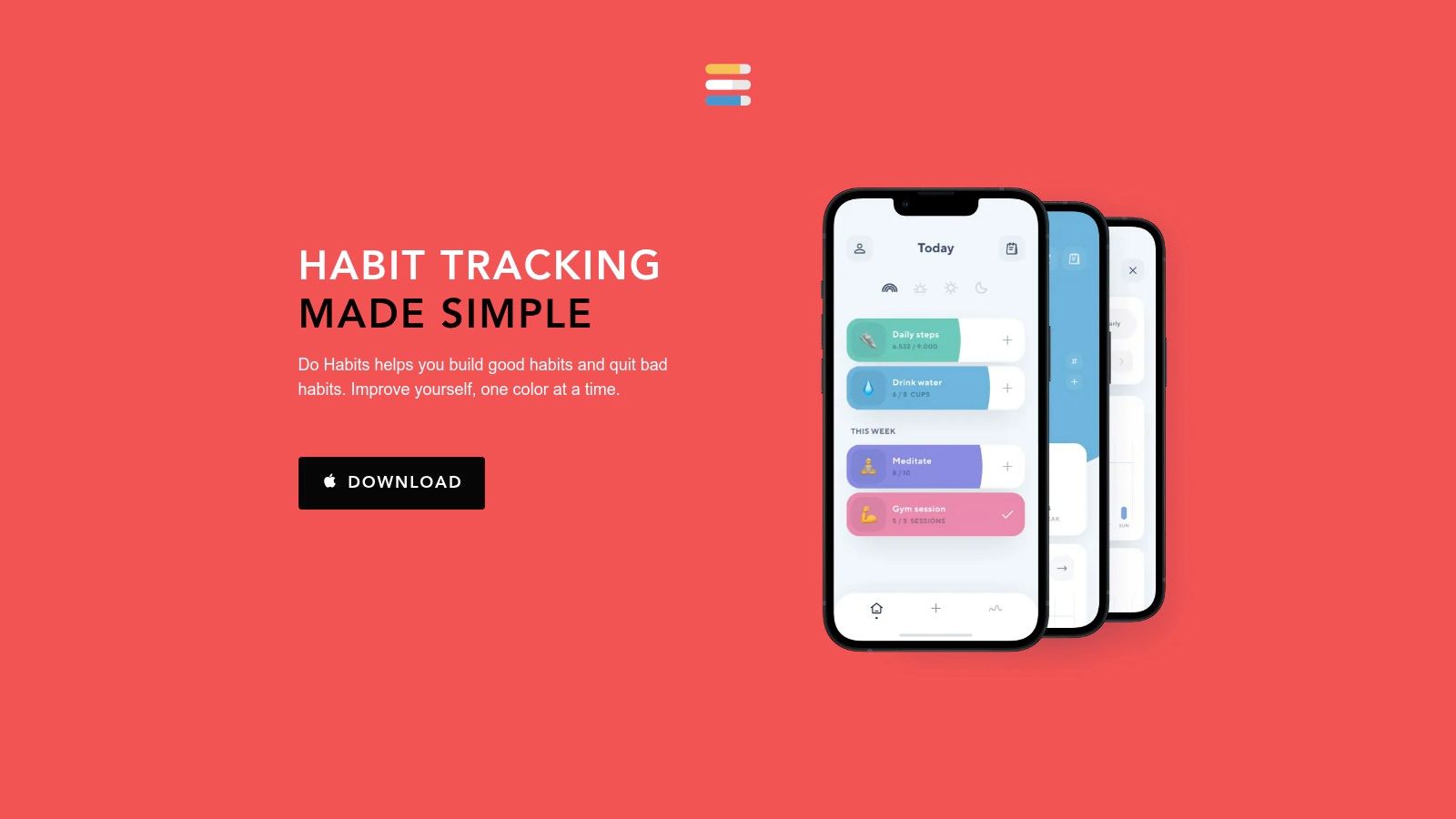
Done excels at tracking both habits to build and habits to quit, offering flexibility that many minimalist apps lack. It also supports tracking a habit multiple times per day, a crucial feature for goals like "drink 8 glasses of water" or "practice piano 3 times." While it's not a powerhouse of data analytics, it provides essential tools like a streak calendar, notes for journaling, and the ability to export your data to a CSV file for personal analysis. Adopting this tool can be a great first step as you unleash your potential with a proactive mindset.
Platform Highlights
- Colorful Interface: Uses a simple, color-coded design that makes tracking feel less like a chore and more like a satisfying game.
- Streak-Focused: The entire user experience is built around visualizing and extending your successful streaks, a powerful motivator for many.
- Flexible Tracking: Supports building good habits, quitting bad ones, and logging a single habit multiple times per day.
- Data Portability: Allows users to export their complete habit history as a CSV file for backup or further analysis.
Our Take: Done is one of the best habit tracking apps for visual learners and anyone motivated by the "don't break the chain" method. Its simplicity is its greatest strength, offering a focused and pleasant experience without overwhelming users.
Real-Life Example: A writer wants to build a habit of writing 500 words daily. They create a habit in Done. Each day they hit their goal, they tap the habit, and a colorful bar on the main screen extends. Seeing this visual representation of their streak grow longer each day provides the simple, powerful motivation they need to keep going.
| Feature | Details |
|---|---|
| Availability | Exclusively on iOS |
| Pricing Model | Free version with a limit of 3 habits; Premium subscription for unlimited habits |
| Unique Offering | A simple, highly visual interface focused purely on building streaks |
| Best For | Beginners and iOS users who prioritize simplicity and visual motivation over complex analytics |
Visit Done – A Simple Habit Tracker
10. TickTick
For those seeking to unify their productivity systems, TickTick offers a compelling all-in-one solution. More than just a habit tracker, it’s a comprehensive task manager, calendar, and Pomodoro timer that integrates habit building directly into your daily workflow. This approach eliminates the need to juggle multiple apps, allowing users to see their tasks, events, and habit goals in a single, cohesive view. The platform’s key strength lies in its powerful feature set and broad cross-platform availability, ensuring your productivity hub is accessible anywhere.
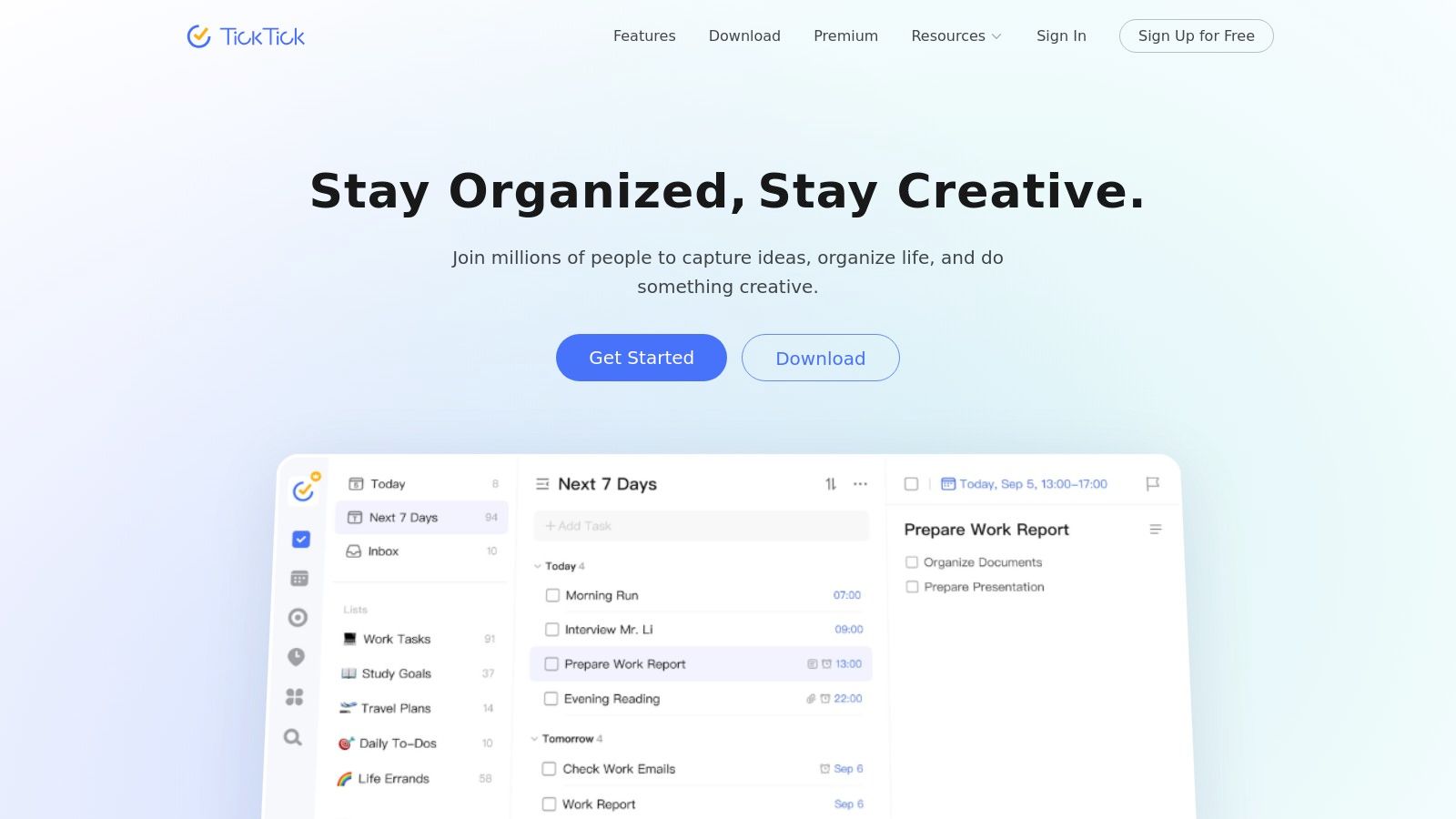
TickTick excels at providing a holistic overview of your commitments. You can schedule a habit check-in alongside a work project or a personal appointment, creating a powerful link between your intentions and actions. The platform provides detailed statistics and check-in logs, helping you visualize progress over time. While its complexity can be a hurdle for users seeking simplicity, it is an ideal choice for power users who want one of the best habit tracking apps integrated into a robust productivity engine, helping them transition away from toxic productivity toward a more balanced approach.
Platform Highlights
- Integrated Workflow: Manage habits directly alongside your to-do lists and calendar events for a unified productivity dashboard.
- Cross-Platform Sync: Offers seamless synchronization across iOS, Android, Web, Mac, and Windows, keeping you on track on any device.
- Built-in Tools: Includes a Pomodoro timer and a "Focus" feature that can be linked directly to specific tasks or habits.
- Rich Customization: Provides flexible reminders, customizable habit frequencies (e.g., three times a week), and detailed statistical reports.
Our Take: TickTick is the ultimate command center for users who want their habits to be a core part of their daily task management. Its ability to consolidate multiple productivity tools into one reliable app is its greatest advantage.
Real-Life Example: A project manager uses TickTick for their work to-do list. They add a "Review team progress" habit that appears in their "Today" view every morning alongside their other tasks. They can check it off just like any other item. This integration ensures their habit-building is not separate from their daily workflow but a core part of it.
| Feature | Details |
|---|---|
| Availability | Web, iOS, Android, macOS, Windows, Apple Watch, and browser extensions |
| Pricing Model | Free basic version; Premium subscription ($35.99/year) unlocks full features |
| Unique Offering | Full integration of habits, tasks, and calendar events in a single platform |
| Best For | Power users and individuals who want a single app for all productivity needs |
Top 10 habit tracking apps compared
This table provides a high-level comparison to help you quickly identify which app best fits your needs based on its core purpose, user experience, pricing model, and standout features.
| Product | Core features | UX (★) | Price/Value (💰) | Target (👥) | Standout (✨/🏆) |
|---|---|---|---|---|---|
| Apple App Store | Curated app marketplace, editorial notes, secure billing, Family Sharing | ★★★★☆ — polished | 💰Varies (free + paid / in‑app) | 👥Apple users seeking vetted apps | 🏆Curated & secure ecosystem ✨cross‑device billing |
| Google Play Store | Large Android catalog, account purchases, refunds, app pages | ★★★★☆ — broad | 💰Varies (free + paid / in‑app) | 👥Android users wanting wide choice | ✨Huge catalog & easy installs |
| Habitify | Cross‑platform sync (mobile, web, desktop), integrations, advanced reminders | ★★★★☆ — consistent | 💰Free tier; Premium subscription | 👥Cross‑platform users wanting parity | ✨Sync + Apple Health, Zapier, API |
| Streaks | Apple Health integration, widgets, Apple Watch support, stats | ★★★★★ — slick | 💰One‑time purchase | 👥Apple users valuing simplicity & reliability | 🏆Best Apple integration ✨one‑time model |
| Strides | 150+ templates, multiple tracker types, charts & reminders | ★★★★☆ — powerful | 💰Free + Strides Plus subscription | 👥Goal‑oriented users needing templates | ✨Flexible tracker types & deep analytics |
| Loop Habit Tracker | Open‑source, offline, privacy‑first, streaks & reminders | ★★★★☆ — lightweight | 💰Free (GPLv3) | 👥Privacy‑conscious Android users | 🏆Privacy & open‑source ✨no account required |
| Habitica | Gamified habits with XP, parties, quests, social features | ★★★★☆ — engaging | 💰Free + optional paid perks/sub | 👥Gamification fans & social groups | ✨RPG mechanics for motivation |
| Way of Life | Fast color‑coded yes/no logging, trend charts, notes | ★★★★☆ — frictionless | 💰Paid app + premium | 👥Users wanting quick daily check‑ins | ✨Minimal, fast logging 🏆clear trends |
| HabitMinder | Prebuilt wellness habits, mini‑activities, widgets & wearables | ★★★★☆ — approachable | 💰Free + Premium | 👥Beginners building health routines | ✨Wellness presets & guided micro‑activities |
| HabitBull | Flexible scheduling, graphs, CSV export, widgets | ★★★★☆ — configurable | 💰Free + in‑app / subscription | 👥Power users needing rules & export | ✨Advanced scheduling & data portability |
| Done – A Simple Habit Tracker | Streak calendar, multi‑times/day, CSV export, colorful UI | ★★★★☆ — simple | 💰Paid app (one‑time) | 👥Streak‑motivated users who want fast logging | ✨Colorful, speedy streak focus |
| TickTick | Tasks + calendar + habit module, Pomodoro, cross‑platform sync | ★★★★★ — versatile | 💰Free + Premium subscription | 👥Productivity users wanting all‑in‑one | 🏆Unified tasks + habits + calendar ✨Pomodoro built‑in |
Your Journey to Better Habits Starts Now
Navigating the landscape of the best habit tracking apps can feel like the first major hurdle in your personal development journey. We've explored a dozen powerful contenders, from the Apple-exclusive elegance of Streaks to the data-rich, Android-friendly interface of Loop Habit Tracker, and the RPG-inspired universe of Habitica. Each tool offers a unique philosophy and feature set, underscoring a critical truth: there is no single "perfect" app for everyone. The best tool is the one that aligns with your personality, your goals, and your lifestyle, creating a system you can genuinely stick with.
Our deep dive has revealed several key themes. For those who thrive on simplicity and visual feedback, apps like Done and Way of Life offer clean, straightforward interfaces that reduce friction and keep the focus squarely on the task. If your motivation is fueled by data and detailed progress reports, Strides and Habitify provide the robust analytics you need to see trends, understand your patterns, and make informed adjustments. For the multitaskers and productivity power-users, integrated solutions like TickTick prove that habit tracking can be seamlessly woven into a broader task management ecosystem.
How to Choose Your Ideal Habit Companion
The decision-making process shouldn't be paralyzing. Instead of getting lost in feature comparisons, anchor your choice to your core needs. Ask yourself these critical questions:
- What is my primary motivation style? Am I driven by maintaining a streak (Streaks), achieving in-game rewards (Habitica), or seeing detailed progress graphs (Strides)?
- How much complexity can I handle? Do I want a simple, set-it-and-forget-it tool (Loop), or a comprehensive system with detailed customization (HabitBull)?
- Which ecosystem am I in? Am I solely on Apple devices, making a one-time purchase for Streaks a great value, or do I need cross-platform sync between Android and web (Habitify, TickTick)?
- What is my budget? Am I looking for a completely free, open-source option (Loop Habit Tracker), or am I willing to invest in a premium subscription for advanced features and analytics?
Answering these questions will narrow your options from twelve to just two or three strong candidates. From there, the best approach is to experiment. Most apps offer a free trial or a freemium version. Commit to using one app for a single, small habit for one week. This hands-on experience is far more valuable than reading another review.
Beyond the App: The Principles of Lasting Change
Remember, the app is merely a vehicle; you are the driver. The most sophisticated habit tracker will fail if the underlying principles of behavior change are ignored. As you implement your chosen tool, keep these foundational strategies in mind:
- Start Impossibly Small: Don't try to track "go to the gym for an hour" every day. Start with "put on workout clothes" or "do five push-ups." The goal is to build momentum and make the action non-negotiable.
- Stack Your Habits: Anchor your new desired habit to an existing one. For example, "After I pour my morning coffee (existing habit), I will meditate for one minute (new habit)."
- Optimize Your Environment: Make your good habits easier and your bad habits harder. If you want to drink more water, leave a water bottle on your desk. If you want to reduce screen time, move social media apps off your home screen.
- Embrace Imperfection: You will miss a day. It’s inevitable. The crucial step is to get back on track immediately. Don't let one missed check-in derail your entire progress. Use the data in your app not as a tool for self-criticism, but as a source of learning.
Ultimately, the goal of using any of the best habit tracking apps isn't just to see a long chain of green checkmarks. It's to build a system of supportive accountability that helps you become the person you aspire to be, one small, intentional action at a time. The technology is simply the catalyst. The real transformation begins with your commitment. Choose your tool, pick your first habit, and start today.
Frequently Asked Questions (FAQ)
1. What is the best free habit tracking app?
For Android users, Loop Habit Tracker is the best free option as it is 100% free, open-source, and has no ads. For iOS users, most top apps like Streaks or Strides offer a freemium model where you can track a limited number of habits for free, which is a great way to start.
2. Are habit tracking apps actually effective?
Yes, they can be highly effective. They provide structure, reminders, and visual feedback (like streaks) that serve as powerful motivators. By making progress tangible and holding you accountable, they significantly increase the likelihood of sticking with a new habit. However, their effectiveness depends on consistent use and a genuine commitment to change.
3. Which habit tracker is best for Apple Watch?
Streaks is widely considered the best for Apple Watch due to its deep integration with Apple Health, interactive complications, and ability to log habits directly from your wrist. HabitMinder is also excellent, especially for wellness habits, as it can guide you through mini-sessions like breathing exercises on the watch.
4. Can I track bad habits as well as good ones?
Yes, many of the best habit tracking apps support this. Apps like Done, Strides, and Habitica allow you to set goals to "quit" a bad habit. They track the days you successfully avoid the habit, creating a streak of success that can be just as motivating as building a positive one.
5. What is the "don't break the chain" method?
This is a productivity method where you mark off each day on a calendar that you complete your habit. The goal is to build a long chain of consecutive marks. The visual chain becomes a powerful motivator because you won't want to break it. Apps like Streaks and Done are built almost entirely around this concept.
6. Is it better to use a simple or complex habit tracking app?
This depends entirely on your personality. If you are easily overwhelmed or just starting, a simple, visually focused app like Done or Way of Life is best. If you are data-driven, have multiple types of goals, or need advanced scheduling, a more complex app like Strides or HabitBull will serve you better.
7. How many habits should I track at once?
When starting, it's best to focus on just one to three new habits. Trying to change too much at once can lead to burnout and failure. Once those initial habits become automatic, you can gradually add more. The goal is sustainable change, not a short-term burst of effort.
8. What is gamification in a habit app?
Gamification, as seen in Habitica, is the use of game-like elements (e.g., points, levels, rewards, avatars) in a non-game context to make tasks more engaging. It turns the chore of habit-building into a fun experience, which can be highly effective for people motivated by rewards and achievements.
9. Do these apps sync across multiple devices?
Many do, but not all. Apps like Habitify and TickTick are built for cross-platform sync across web, desktop, and mobile (iOS/Android). Others, like Streaks and Strides, are exclusive to the Apple ecosystem but sync perfectly across iPhone, iPad, Mac, and Apple Watch. Loop Habit Tracker is Android-only and does not sync.
10. Are my habit tracking data private?
It varies by app. An app like Loop Habit Tracker is designed for privacy, storing all data locally on your device with no account required. Most other apps require an account to sync data across devices, which means your data is stored on their servers. Always check the app's privacy policy in the App Store or Google Play Store before downloading if this is a major concern.
How we keep this guide current
Everyday Next reviews the official developer website and current app-store listing before making a recommendation. We check platform support, pricing model, recent availability, privacy information, and whether the product still fits the use case assigned to it. A listing here is not a guarantee that an app will suit every user, and app features or prices may change after publication. If you spot an outdated detail, please contact us; verified corrections are handled under our corrections policy.
For more on how selections are researched and disclosed, read the Everyday Next editorial standards.
Related Posts


Previous Post
Next Post









Pingback: Why Is Personal Development Important? Your 2026 Guide
Pingback: The 12 Best Free Budgeting Apps of 2026 to Master Your Money